
Example 1.34: Quickly calculate the liquidus and solidus temperatures for a series of alloys
Purpose: Quickly find the liquidus or the solidus temperatures for a series of alloys
Module: PanPhaseDiagram
Database: Al_Demo.rtdb
Batch files: Example_#1.34a.pbfx, Example_#1.34b.pbfx, Example_#1.34c.pbfx, Example_# 1.34d.pbfx
Here we use Example_# 1.34a.pbfx to explain the meaning and syntax in the batch file:
<pbfx version="1.0" encoding="utf-8">
<calculation name="Example_#1.34a" type="point">
<databases>
<database type="rtdb" file_name="Al_Demo.rtdb"/>
</databases>
<units>
<unit name="P" value="bar"/>
<unit name="T" value="K"/>
<unit name="n" value="x"/>
</units>
<system name="Default_System">
<components>
<component name="Al" status="Selected"/>
<component name="Mg" status="Selected"/>
<component name="Zn" status="Selected"/>
</components>
<phases>
<phase name="*" status="Entered" />
</phases>
<points>
<point>
<statespace>
<T value="1000"/>
<P value="1"/>
<n component="Al" value="0.8" start="0" stop="0.8" step="0.1" />
<n component="Mg" value="0.2"/>
<n component="Zn" value=""/>
</statespace>
</point>
</points>
<condition>
<equilibrium_type type="Liquidus"/>
</condition>
</system>
<output unit="">
<tables>
<table name="Default" source="Default" type="Default">
<column name="T"/>
<column name="x(*)"/>
<column name="phase_name"/>
<column name="f(@*)"/>
<column name="G"/>
<column name="w(*)"/>
<column name="Label"/>
</table>
</tables>
<graphs>
<graph name="Default" type="triangle">
</graph>
</graphs>
</output>
</calculation>
</pbfx>
In this batch file, a series of calculation points is defined using a loop. Specifically, the composition of Al varies from 0 to 0.8 with a step size of 0.1, Mg is fixed at 0.2, and Zn is set as the balance. In the Condition section, the parameter “Equilibrium_type” is set to “Liquidus”. Using this batch file, the liquidus temperatures for the series of alloy compositions defined by the composition loop can be calculated directly.
Example_#1.34b.pbfx provides an example for defining a series of compositions that cannot be described by a simple loop. In this case, the alloy compositions are read from a text file:.
<condition>
<alloy_file name="Alloys_AlMgZn.txt" />
<equilibrium_type type="Liquidus"/>
</condition>
Similarly, Example_# 1.34c.pbfx and Example_#1.34d.pbfx are used to calculate the solidus temperatures for a series of alloys defined by a composition loop and by importing compositions from a text file, respectively.
Figure 1.34.1 shows the calculated liquidus and solidus temperatures by using Example_# 1.34a.pbfx and Example_#1.34c.pbfx.
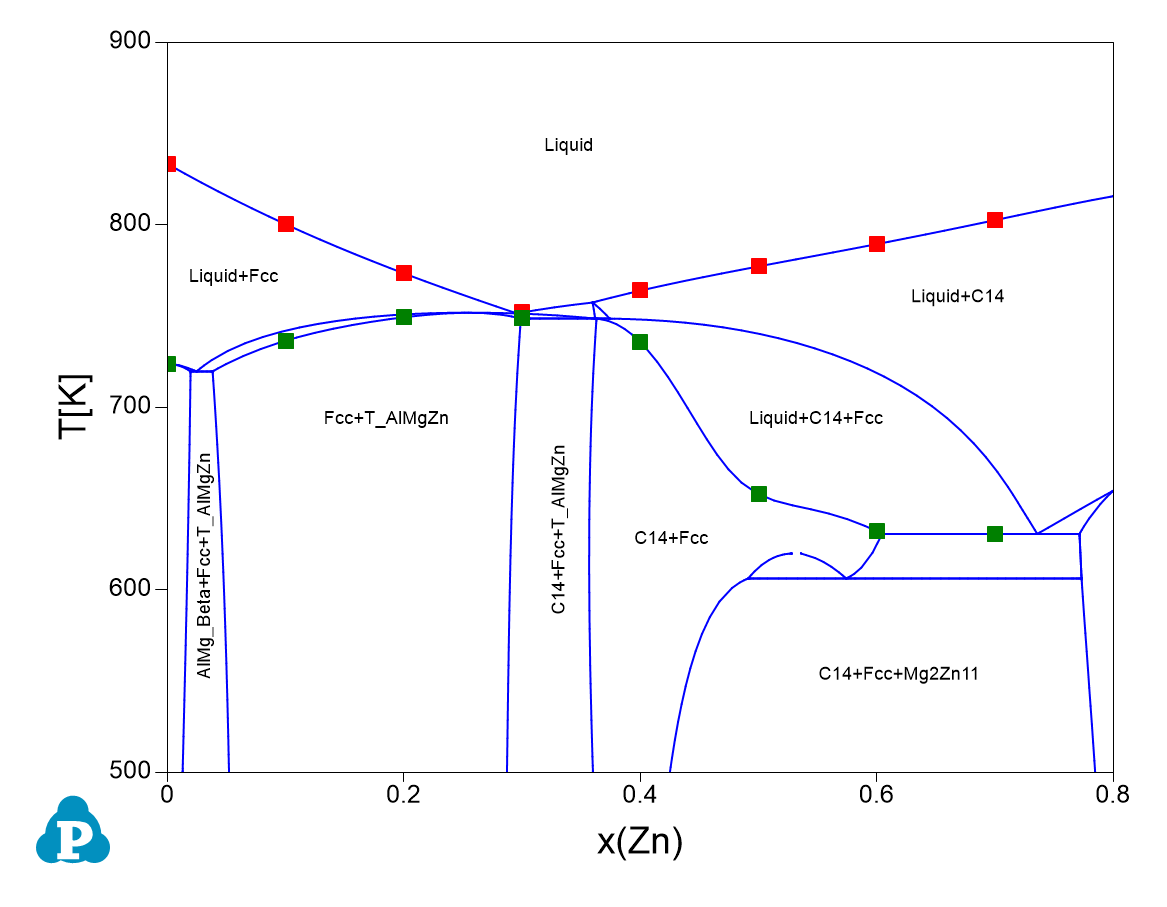
Figure 1.34.1: The quickly obtained liquidus and solidus temperature of some alloys located in Al-0.2Mg-xZn section.