
Example 4.5: Diffusion among Multiple Regions
Purpose: Learn to perform diffusion simulation at constant temperature for a carburization process with a fixed chemical composition at boundary.
Module: PanDiffusion
Thermodynamic and Mobility Database: Fe-Demo.rtdb
Batch file: Example_#4.5.pbfx
Calculation Procedures:
- Create a workspace and select the PanDiffusion module following Pandat User’s Guide: Workspace;
- Load Fe-Demo.rtdb following the procedure in Pandat User’s Guide: Load Database, and select Cr, Fe, Ni three components;
- Click on the menu "PanDiffusion → Diffusion Simulation" and set up the calculation condition as shown in Figure 4.5.1. First click the blue “+” above Regions to add another region, Region_3. Select "Region Composition Distribution" as Uniform.
- Click on Region_1 and set the composition of the left region of the diffusion couple as 30Cr-10Fe-60Ni (at%), Select Fcc as the entered phase in “Select Phases” of “Settings for the Selected Region [Region_1]”.
- Click on Region_2 and set the composition of the middle region of the diffusion couple as 55Cr-40Fe-5Ni (at%). Select Bcc as the entered phase in “Select Phases” of “Settings for the Selected Region [Region_2]”.
- Click on Region_3 and set the composition of the right region of the diffusion couple as 10Cr-20Fe-70Ni (at%). Select Fcc as the entered phase in “Select Phases” of “Settings for the Selected Region [Region_3]”.
- The length of each region is set to be 100 mm, and the total number of grids (# of Grids) is 100.
- The Thermal History is holding the diffusion couple at 1000 °C for 500 hours.
- Click “Select Phase” and set Fcc and Bcc as the entered phases.
- In the settings shown in Figure 4.5.1, composition profiles at the initial and final stages, as well as that at 200 hour will be outputted. Click OK to perform calculations.
Post Calculation Operation:
- Change graph appearance and add text following the procedure in Pandat User’s Guide: Property. The calculated plot is show in Figure 4.5.2
Information obtained from this calculation:
- The three regions of the diffusion triple locate at different phase fields, the one in Bcc is sandwiched between two regions in the Fcc as shown in Figure 4.5.3;
- After holding the diffusion couple at 1000°C for 500 hours, composition profiles can be viewed at final stage (500h) and intermediate stage (200h). The phase boundaries are moved;
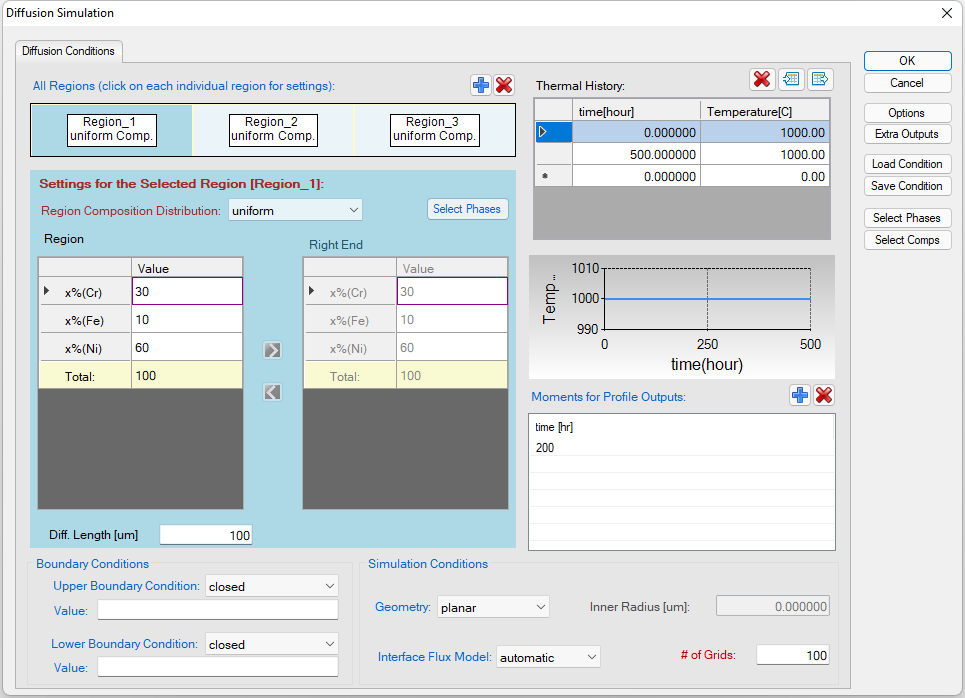
Figure 4.5.1: Setting of the simulation condition
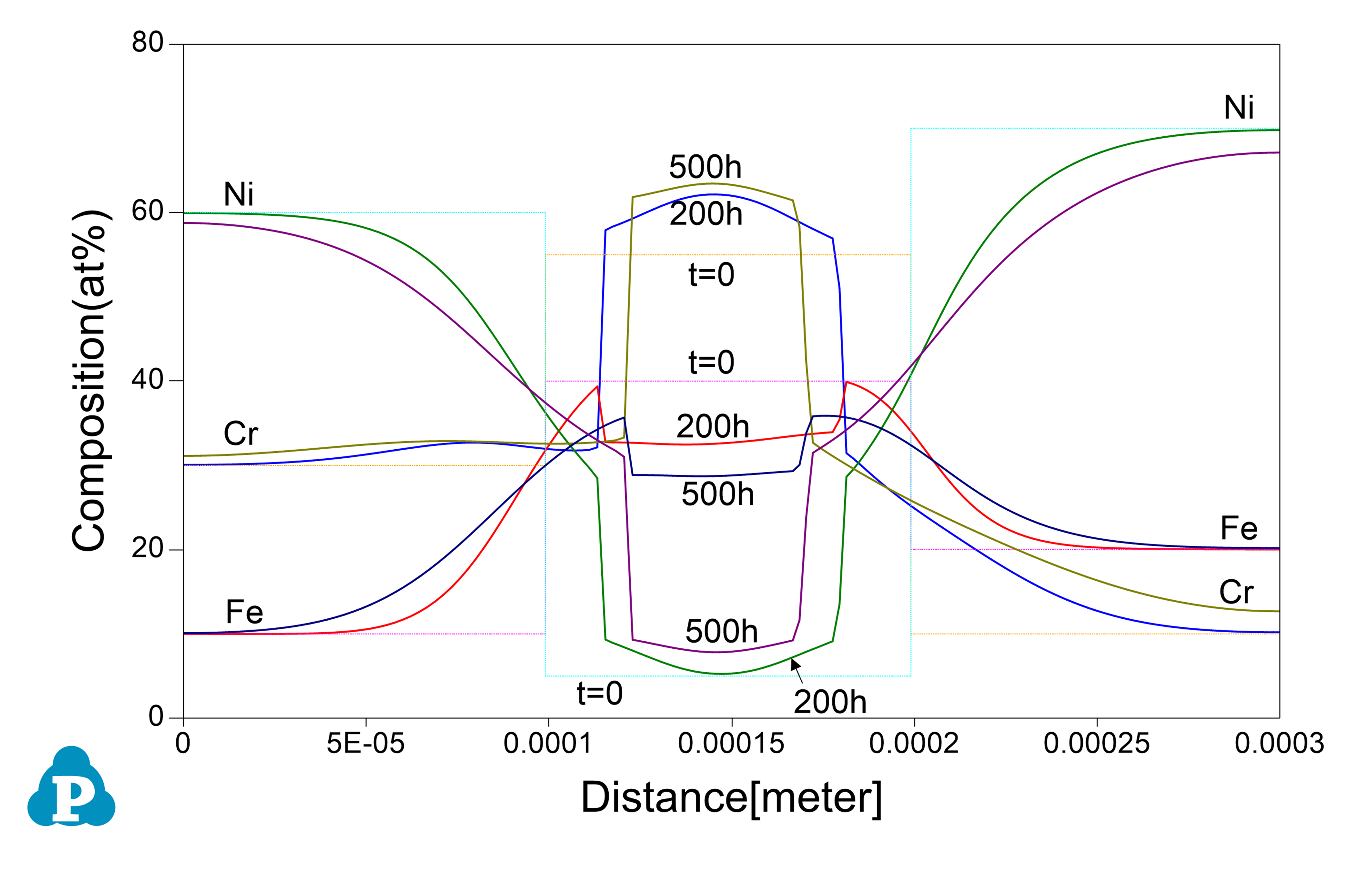
Figure 4.5.2: Calculated composition profiles for the diffusion sandwich at 1000°C for 200h and 500h
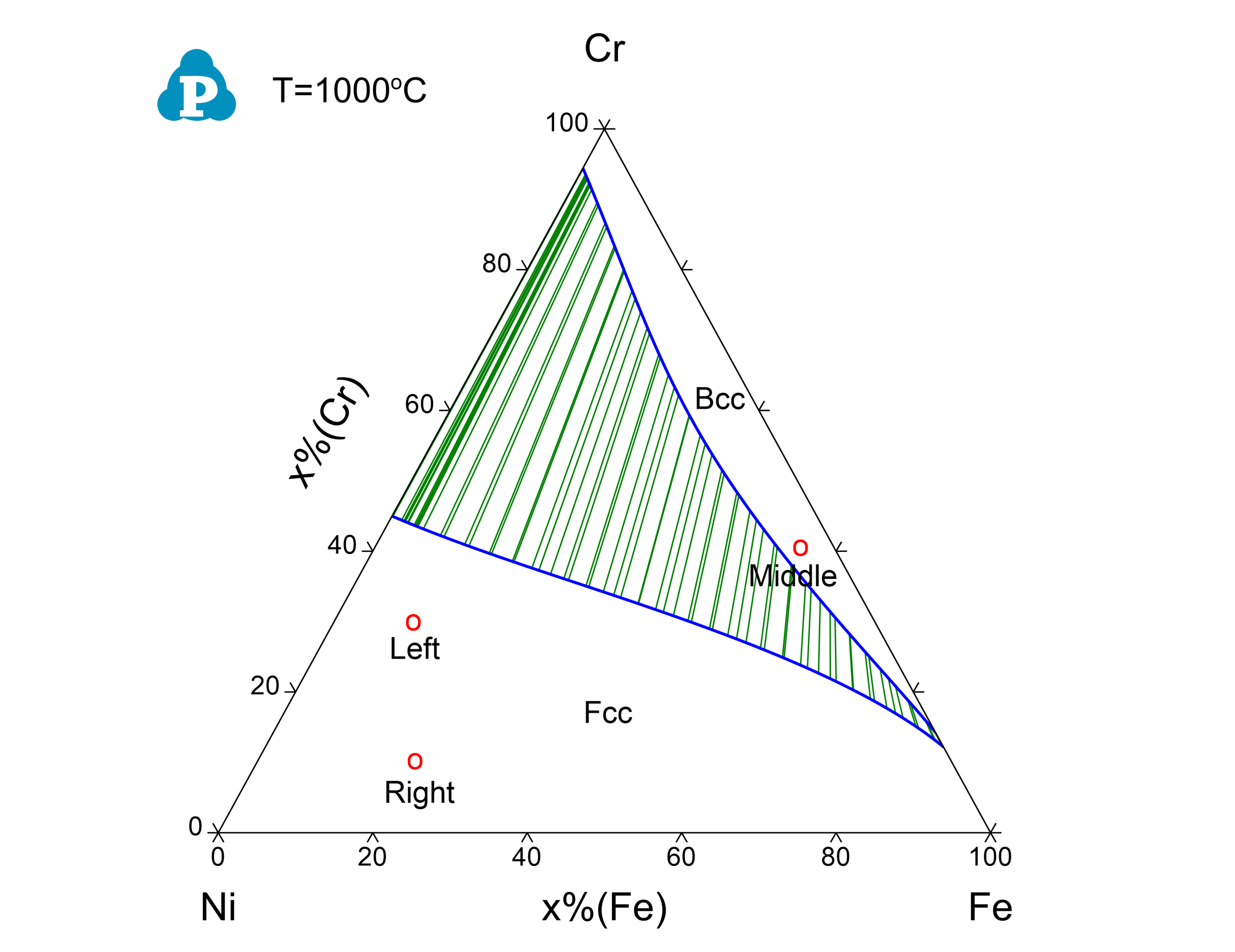
Figure 4.5.3: Isothermal section of Ni-Cr-Fe at 1000 °C, the initial compositions of the left and right regions locate in the single Fcc phase field, while the middle region locates in the Bcc phase field