
Example 4.12: Dissolution of a Single θ-Al2Cu Particle in FCC Matrix
Purpose: Learn to perform single-particle dissolution simulation.
Module: PanDiffusion
Thermodynamic and Mobility Database: Al_Demo.rtdb
Batch file: Example_#4.12.pbfx
Calculation Procedures:
- Create a workspace and select the PanDiffusion module following Pandat User’s Guide: Workspace;
- Load Al_Demo.rtdb following the procedure in Pandat User’s Guide: Load Database and select Al, Cu two elements;
- Click on the menu "PanDiffusion → Dissolution Simulation" or click the icon
 and set up the calculation condition as shown in Figure 4.12.1;
 - Click on “Select Phases” and make Fcc and AlCu_Theta the entered phases, while other phases are suspended;
- In Alloy Composition set a composition of Al-1.55Cu (at%);
- The total number of grids (# of Grids) is 100;
- The Geometry of particles is set to “Spherical”;
- In “Phase Information”, select Fcc as “Matrix Phase”.
- To add a particle, click the blue “+” button in the "Particle" field, then select AlCu_Theta in “Phase Name”. “Particle Size” is set to 3.0 mm. “Vol. Fraction” is set to 0.008;
- The “Thermal History” is a period of 35 minutes at 550°C;
- Click OK to start calculation;
- By default, dissolution simulation gives time-evolution of particle size as output. In order to display composition profile at desired moments, click the blue “+” button next to the “Moments for Profile Outputs” and input a time value. As shown in Figure 4.12.1, profiles at 10 minutes and 15 minutes will be outputted. Click OK to start calculation;
- Details on these options can be found in Pandat User’s Guide: Settings in Particle Dissolutioin Simulation.
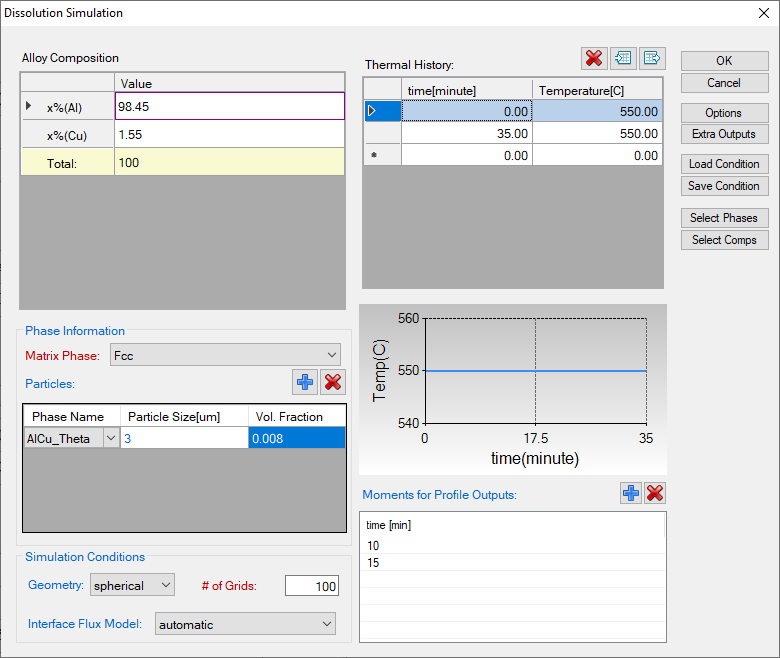
Figure 4.12.1: Setting of the simulation condition
Post Calculation Operation:
- The calculated particle dissolution with time is shown in Figure 4.12.2. User can modify it by changing the title, the scale and so on from the Property Window. User can also add experimental data by clicking menu "Table → Import Table From Files", and select Example_#4.12.txt, and then follow Example 3.1: Prercipitation Simulation of Ni-14Al (at%) Alloy to add the experimental data on the plot. More information about change graph appearance can be found in Pandat User’s Guide: Property.
- Click and open the Default table and select “distance”, “x%(Al)” and “x%(Cu)” to plot the composition profiles at starting, ending and the two selected intermediate times as shown in Figure 4.12.3.
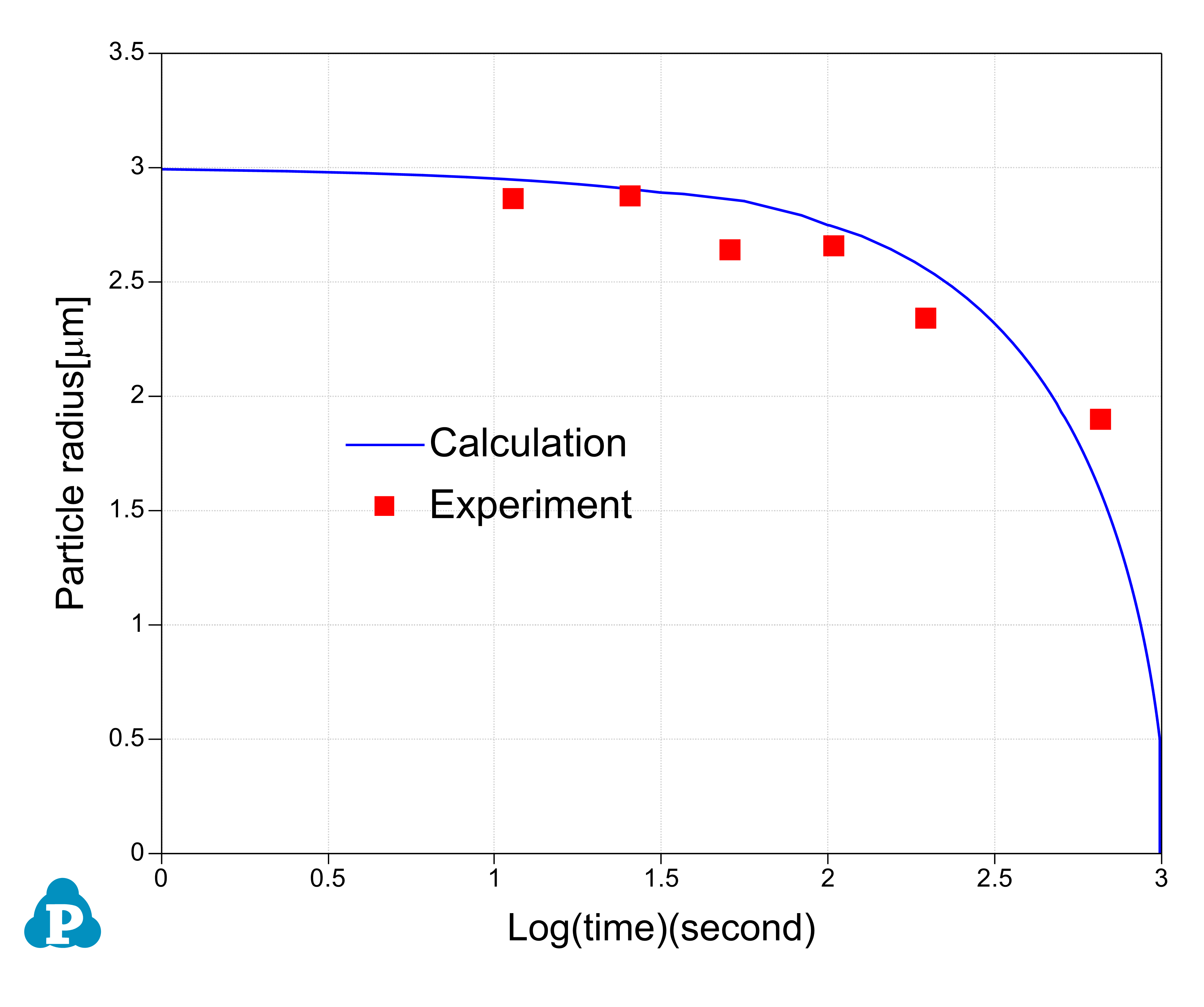
Figure 4.12.2: The simulation result of particle-size evolution
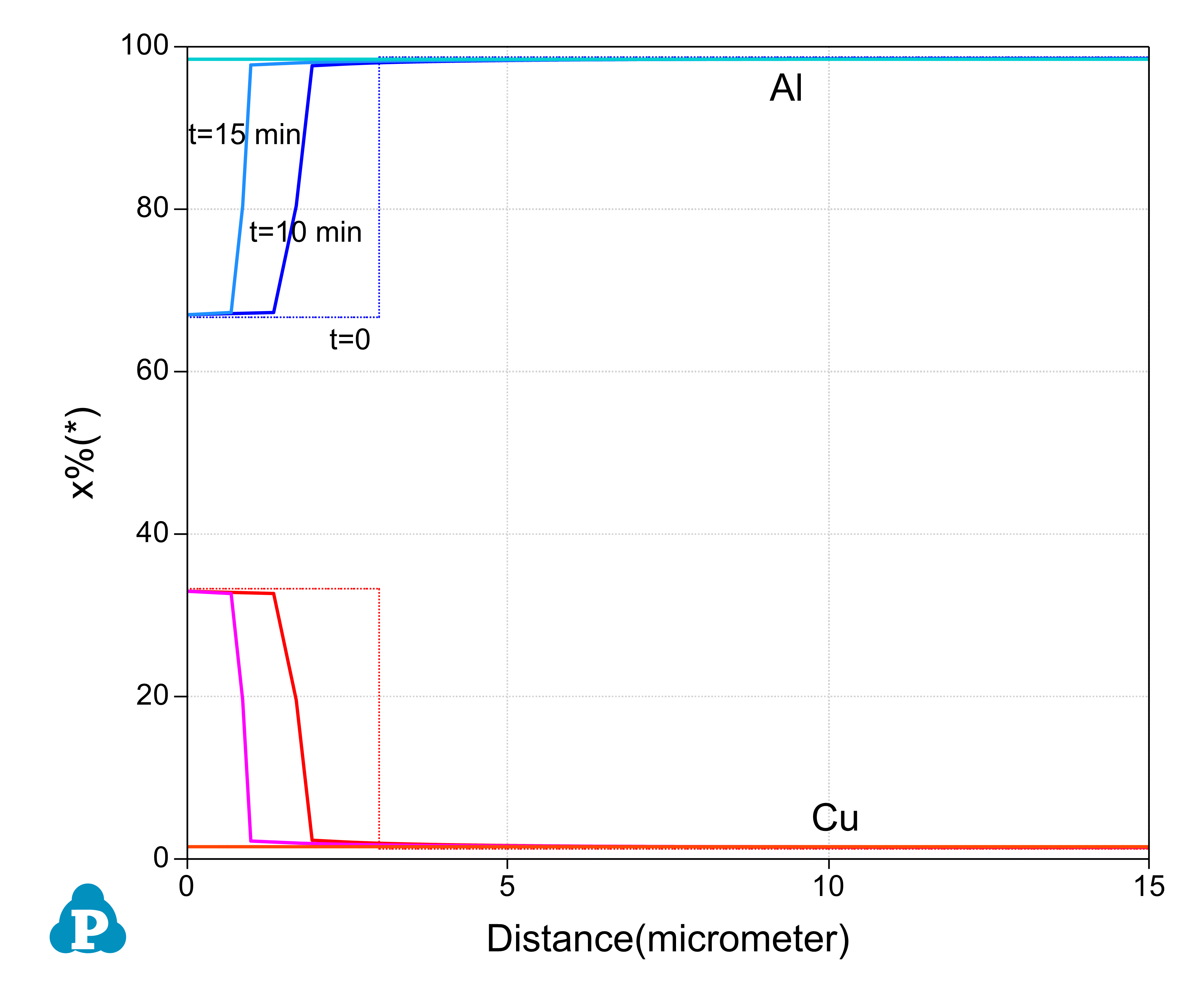
Figure 4.12.3: The simulation result of composition-profile evolution